
Skip to content
Reliable Hosting. Radically Better Service.
Rad Web Hosting
WORDPRESS HOSTING · BUILT TO CREATE

Build something remarkable with faster WordPress hosting.

Give your website the right foundation: fast SSD storage, LiteSpeed, simple cPanel tools, staging environments, and people ready to help you move.

✓ SSD Storage✓ SSL Included✓ cPanel Tools
LITESPEEDSSD STORAGECPANELSSL INCLUDEDDALLAS, TX
FIND YOUR FIT

Choose a plan that fits your next project.

Compare the published plan allowances, then continue to secure checkout to confirm your final billing terms.

WORDPRESS HOSTING

WP Personal

For your first site

$3.99/mo*
Published standard rate $7.99/mo
Configure plan ↗
  • SSD storage5 GB
  • Monthly transfer10 GB
  • Hosted domains1
  • Email accounts3
  • SFTP / FTP accounts1
  • Databases1

✓ SSL   ✓ cPanel   ✓ LiteSpeed

WORDPRESS HOSTING

WP Corporate

For multiple projects

$14.99/mo*
Published standard rate $29.99/mo
Configure plan ↗
  • SSD storage50 GB
  • Monthly transfer200 GB
  • Hosted domains10
  • Email accounts150
  • SFTP / FTP accounts20
  • Databases20

✓ SSL   ✓ cPanel   ✓ LiteSpeed

WORDPRESS HOSTING

WP Enterprise

For demanding portfolios

$24.99/mo*
Published standard rate $49.99/mo
Configure plan ↗
  • SSD storage100 GB
  • Monthly transfer400 GB
  • Hosted domains10
  • Email accounts300
  • SFTP / FTP accountsUnlimited
  • DatabasesUnlimited

✓ SSL   ✓ cPanel   ✓ LiteSpeed

*Advertised promotional monthly equivalents on a 36-month (triennial) billing term, as shown on the legacy pages. Prices and discount code DEC23 are not independently confirmed in WHMCS; the checkout total controls. Moodle Corporate and Agency product IDs were not verified, so those buttons open the secure cart instead of an unverified product.

WordPress application logo
APPLICATION HOSTINGWordPress
WHAT'S INCLUDED

Everything you need to build beautifully.

Practical performance, security and productivity tools built for WordPress projects.

Speed for every page

LiteSpeed web server and SSD storage give WordPress sites an efficient foundation.

Staging without stress

Test theme, plugin, and design changes on a staging copy before publishing.

Tools developers appreciate

Work with WP-CLI, SSH, databases, and PHP tools alongside cPanel.

Protection built into hosting

SSL certificates, security controls, and offsite backups help protect your work.

Easy WordPress management

Use cPanel and the application installer to manage files, email, databases, and installs.

Migration assistance

Bring eligible existing websites over with migration assistance from our team.

Service overview

WordPress Hosting workflow

A guide to the existing website-management tools.
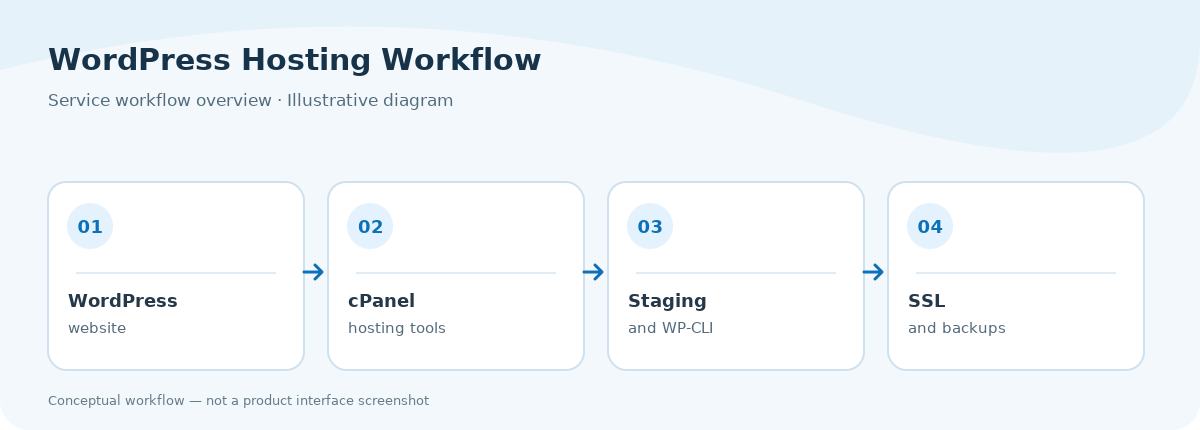
Four components of WordPress hosting: website, cPanel tools, staging and WP-CLI, and SSL and backups.
Illustrative workflow based on the service features described above. Not a screenshot of the live product.
A BETTER WORKFLOW

More creating. Less managing.

Stage your changes, work with WP-CLI, and keep your site protected with SSL and backups. Everything starts from a familiar hosting dashboard.

Speak with support ↗
START IN THREE STEPS

From idea to online.

01

Pick your WordPress plan

Match your website traffic, storage and domain needs.

02

Move or install WordPress

Start fresh or request migration assistance for an eligible site.

03

Publish and improve

Use staging, SSL and WordPress tools to build and maintain your website.

PUBLISHED SERVICE PRICING

Compare all published configurations

Published promotional prices and specifications from the original service page. Review the checkout for current totals, billing periods and add-ons.

PlanPublished from / mo*Included specificationsOrder
WP Personal$3.99
  • 5 GB (SSD) Storage Disk Space
  • 10 GB Traffic Bandwidth
  • 1 Domain Domain
  • 3 Email Accounts Email Users
  • 1 SFTP/FTP Accounts SFTP/FTP User
  • 1 Database Database
  • Staging Sites Free Staging Sites
  • cPanel cPanel
  • Free Migration Free Migration
  • WP-CLI/SSH Enabled WP-CLI/SSH Access
  • Free SSL Free SSL Certificates
  • Free LiteSpeed Free LiteSpeed
  • Dallas, Texas Data Center Location
Configure
WP Business$9.99
  • 15 GB (SSD) Storage Disk Space
  • 50 GB Traffic Bandwidth
  • Up to 5 Domains Domains
  • 50 Email Accounts Email Users
  • 10 SFTP/FTP Accounts SFTP/FTP Users
  • 10 Databases Databases
  • Staging Sites Free Staging Sites
  • cPanel cPanel
  • Free Migration Free Migration
  • WP-CLI/SSH Enabled WP-CLI/SSH Access
  • Free SSL Free SSL Certificates
  • Free LiteSpeed Free LiteSpeed
  • Dallas, Texas Data Center Location
Configure
WP Corporate$14.99
  • 50 GB (SSD) Storage Disk Space
  • 200 GB Traffic Bandwidth
  • Up to 10 Domains Domains
  • 150 Email Accounts Email Users
  • 20 SFTP/FTP Accounts SFTP/FTP Users
  • 20 Databases Databases
  • Staging Sites Free Staging Sites
  • cPanel cPanel
  • Free Migration Free Migration
  • WP-CLI/SSH Enabled WP-CLI/SSH Access
  • Free SSL Free SSL Certificates
  • Free LiteSpeed Free LiteSpeed
  • Dallas, Texas Data Center Location
Configure
WP Enterprise$24.99
  • 100 GB (SSD) Storage Disk Space
  • 400 GB Traffic Bandwidth
  • Up to 10 Domains Domains
  • 300 Email Accounts Email Users
  • Unlimited SFTP/FTP Accounts SFTP/FTP Users
  • Unlimited Databases Databases
  • Staging Sites Free Staging Sites
  • cPanel cPanel
  • Free Migration Free Migration
  • WP-CLI/SSH Enabled WP-CLI/SSH Access
  • Free SSL Free SSL Certificates
  • Free LiteSpeed Free LiteSpeed
  • Dallas, Texas Data Center Location
Configure

SERVICE FAQ

Frequently asked questions

What is WordPress?
WordPress is a highly versatile and widely-used content management system (CMS) that allows users to create, edit, and manage websites. Initially released on May 27, 2003, by Matt Mullenweg and Mike Little, WordPress was originally designed as a blog-publishing system but has evolved into a comprehensive platform capable of supporting all types of web content, including more traditional mailing lists and forums, media galleries, and online stores.
Does WordPress Hosting include migration service?
Yes, WordPress Hosting includes white-glove, hands-free migration for your existing WordPress website to your new server.
How long does the setup and delivery take after I order?
WordPress Hosting accounts are setup instantly. Our average provisioning time is just 2-5 minutes from confirmed invoice payment to accessible server. Once your account is fully-provisioned, your server details and account credentials will be provided through our secure Client Portal.
Can I host multiple websites on an WordPress Hosting account?
Yes, depending on your hosting plan, you can host multiple websites on a single WordPress Hosting account using the "Addon Domains" feature in cPanel. This allows you to manage multiple websites from one cPanel dashboard, though they will share the same server resources.
What should I do if my website exceeds the resource limits of my WordPress Hosting plan?
If your website exceeds the resource limits of your WordPress Hosting plan, you may experience slow loading times or downtime. Consider upgrading to a higher plan with more resources, optimizing your website for better performance, or moving to a VPS or dedicated server for additional resources and control.
How do I secure my website on WordPress hosting?
To secure your website, regularly update all software and scripts, use strong passwords, and install security plugins or applications. cPanel also offers security features like IP address denials, password-protected directories, SSL/TLS manager for installing SSL certificates, and the HotLink protection tool. Additionally, all Rad Web Hosting shared hosting accounts are protected by a web application firewall (WAF) for added security.
How can I backup my website on WordPress hosting?
You can back up your WordPress website directly from the cPanel dashboard. Look for the "Backup" or "Backup Wizard" section. From there, you can choose to back up your entire site, specific files, databases, or email configurations. Rad Web Hosting also provides account backups on a regular basis in case of emergency.
What is the cost for additional (burst) bandwidth?
Bandwidth overages-or "burst" (bandwidth exceeding monthly allotment)-is billed at $0.025/GB.
Can I get a dedicated IP address for my WordPress hosting account?
Yes, you can get a dedicated IP address for WordPress hosting accounts for an additional fee. You'll have the opportunity to choose whether your account should have a dedicated IP assignment on the order form.
Do WordPress Hosting accounts support IPv6?
Yes, WordPress Hosting supports IPv6. Rad Web Hosting supports IPv6 enablement. All websites will have access to IPv6.
Do you provide 24/7 support for WordPress Hosting?
Yes, we absolutely provide 24/7 in-house support. Open a support ticket anytime to get fast and helpful support.
What payment methods are accepted for WordPress Hosting?
We accept Credit Cards (Visa, MasterCard, Discover, American Express), PayPal, Bitcoin (BTC), Ethereum (ETH), Bitcoin Cash (BCH), Litecoin (LTC), Dogecoin (DOGE), Dai (DAI), Tether (USDT), Shiba Inu (SHIB), ApeCoin (APE), US Dollar Coin (USDC), Monero (XMR), Dash (DASH), Solana (SOL), Avalanche (AVAX), Tron (TRX), Tokamak Network (TON), VERSE (VERSE) and Stripe for Credit/Debit Cards and ACH payments. Please contact us to discuss additional payment options if we do not currently offer a suitable option for your needs.
NEXT STEPS

Need deeper server control?

Explore managed VPS for a more hands-on server solution, or WooCommerce hosting for your store.