Take full control with KVM virtualization, enterprise SSD storage and the trusted cPanel/WHM toolkit for managing websites, email and customer accounts.
*Advertised monthly equivalents based on a 36-month term. Promotional code FAST50 and the cPanel/management configuration options are carried from the current public checkout links. Prices, licensing, option availability, management scope, taxes and term discounts must be verified in WHMCS before publication. The previous cPanel VPS page has contradictory descriptions of included server management; this design makes no full-management promise for the standard cPanel product.
ALL SERVER SIZES
Explore the full cPanel VPS lineup.
Compare the published resource tiers from 4 GB to 192 GB RAM. Each includes cPanel/WHM on the current public offer.
All 11 configurations · 36-month advertised monthly equivalent
KVM-SSD-12832 vCPU128 GB2,048 GB$527.35Select plan ↗
KVM-SSD-19248 vCPU192 GB3,072 GB$746.80Select plan ↗
DESIGNED FOR REAL-WORLD HOSTING
A serious server, with straightforward controls.
Build multi-site hosting environments, manage accounts, and tune your own server configuration.
▦
WHM + cPanel
Provision and administer individual hosting accounts with WHM and give users access to cPanel.
◇
KVM isolation
Virtualization designed for independent server environments and dedicated resource allocations.
▣
SSD RAID 10 storage
Fast enterprise SSD arrays underpin the listed VPS plans.
↗
Scale your stack
Upgrade RAM, vCPU or storage when your hosting environment grows.
⌘
Full root access
Configure compatible software, administer services and control your VPS environment.
◎
Support around the clock
24/7 support access for the VPS platform. Management services are a separate consideration.
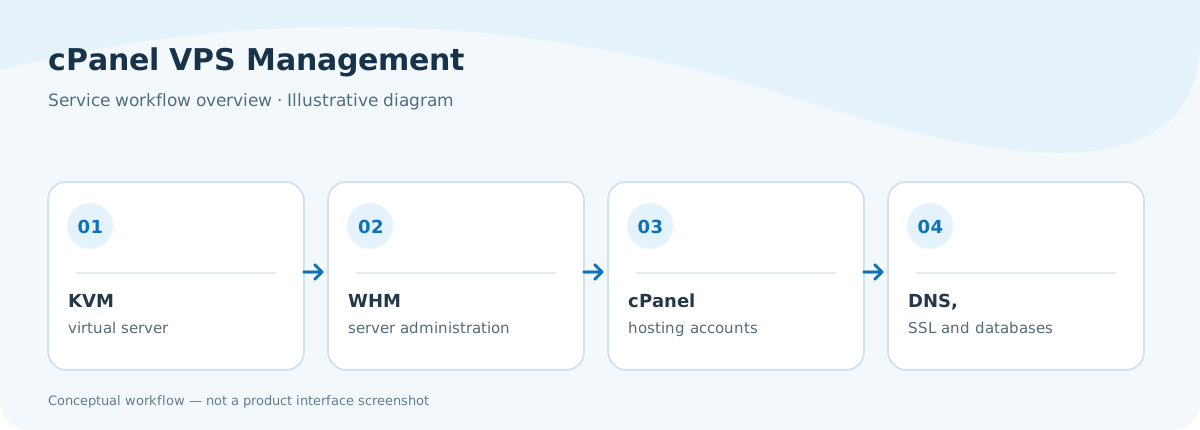
Service overview
cPanel VPS management workflow
How the VPS and hosting control panels relate.
Illustrative workflow based on the service features described above. Not a screenshot of the live product.
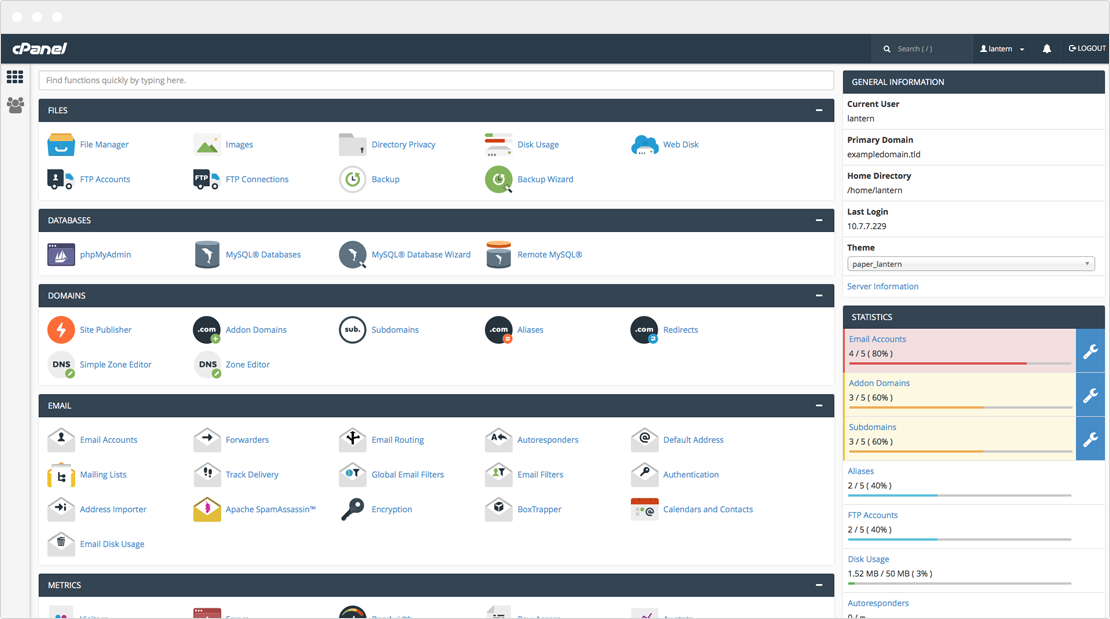
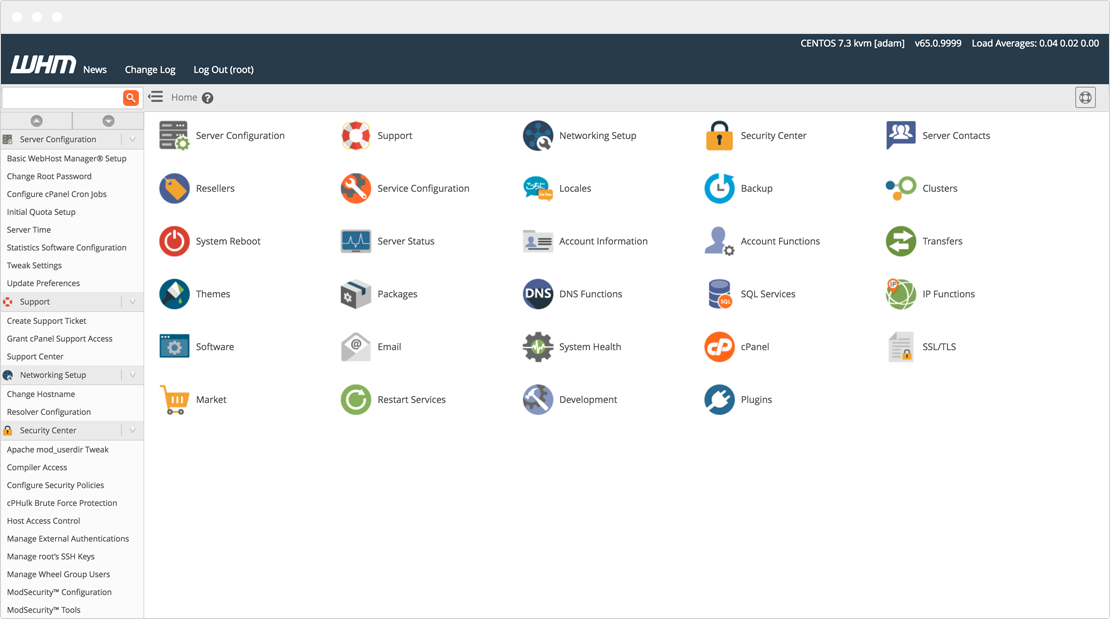
Explore cPanel and WHM interfaces
See the existing cPanel and WHM dashboard screenshots published on Rad Web Hosting. Interface appearance and available tools may depend on your software version and license.
Published RWH cPanel interface screenshotPublished RWH WebHost Manager interface screenshot
THE CONTROL PANEL YOU KNOW
One place to manage your hosting stack.
Run sites, email, databases, DNS and hosting accounts through the well-known cPanel/WHM interface. Customize your setup with software and features compatible with your selected license.
Select the CPU, memory, storage and monthly transfer that fit your workloads.
02
Customize at checkout
Confirm the cPanel license, billing term, location and optional management services in WHMCS.
03
Launch with confidence
Access WHM, cPanel and your VPS dashboard after provisioning.
SERVICE FAQ
Frequently asked questions
What is cPanel VPS hosting?
cPanel VPS Hosting utilizes server virtualization technology to create unique virtual private servers from physical server hardware. Each server, or VPS, is now capable of hosting its own unique operating system and software. With cPanel VPS, each server includes cPanel and WHM control panel software included.
What is KVM?
KVM hypervisor enables full virtualization capabilities. It provides each VPS with all typical services of the physical system, including virtual BIOS (basic input/output system) and virtual hardware, such as processor, memory, storage, network cards, etc. As a result, every VPS completely simulates a physical machine.
What are the benefits of VPS hosting?
VPS (Virtual Private Server) hosting offers several benefits that make it a popular choice for many businesses and individuals looking to host their websites or applications. Here are some of the key advantages:
Resource Allocation: VPS hosting provides dedicated portions of a server's resources, including CPU time, memory, and disk space. This means you don't have to share these resources with other users as you would with shared hosting, leading to better performance and stability.
Scalability: With a VPS, it's relatively easy to scale resources up or down depending on your needs. This flexibility is great for businesses that experience fluctuating traffic or are in growth phases.
Control: VPS hosting gives you root access to your server, allowing for advanced customization and configuration. You can install and run any software you choose, set up your server environment exactly the way you want, and manage security settings according to your specifications.
Cost-Effectiveness: Compared to dedicated hosting, VPS provides a more affordable option while still offering many of the same benefits, such as dedicated resources and administrative control.
Security: Since you're not sharing your operating system with other users, there are fewer vulnerabilities that could affect your server. Most VPS providers also offer built-in security features, such as firewalls and regular backups.
Performance: Having dedicated resources ensures that your hosting is more reliable and your website runs more smoothly than it might on shared hosting, where the activities of other users can impact your site's performance.
Isolation: Each VPS is isolated from the others, ensuring that problems in one environment do not impact another. This adds an extra layer of security as issues like a virus or a software malfunction are contained within a single virtual environment.
These benefits make VPS hosting a strong choice for those who need more control and better performance than shared hosting can provide, but with less cost and complexity than managing a dedicated server.
How much do cPanel VPS servers cost?
You can launch a cPanel VPS server from as little as $52.54 USD per month (including software license) with instant delivery from Rad Web Hosting.
How do I connect to my cPanel VPS?
You can connect to the cPanel VPS from the control panel, your client area, VNC, or SSH-using a free software called Putty.
What operating systems are available for cPanel VPS?
cPanel/WHM supports the following operating systems: Ubuntu, AlmaLinux, and CloudLinux.
What payment methods are accepted for cPanel VPS?
We accept Credit Cards (Visa, MasterCard, Discover, American Express), PayPal, Bitcoin (BTC), Ethereum (ETH), Bitcoin Cash (BCH), Litecoin (LTC), Dogecoin (DOGE), Dai (DAI), US Dollar Coin (USDC), and Credit/Debit Cards and ACH payments. Please contact us to discuss additional payment options if we do not currently offer a suitable option for your needs.
Do cPanel VPS Servers support IPv6?
Yes, our cPanel VPS servers support IPv6. Rad Web Hosting supports IPv6 enablement. Each VPS is automatically assigned a /64 IPv6 subnet (18,446,744,073,709,551,616 IPs) at no cost. More information about IPv6 networking can be found at VPS Guides -> Explanation of VPS IPv6 Resources.
Are the cPanel VPS Servers Managed or Unmanaged?
By default, cPanel VPS are provided as unmanaged servers. If you would prefer a fully-managed cPanel VPS server, we offer multiple management levels to meet your specific requirements. Speak with an agent in our live chat or open a ticket with our Sales department to receive more information on managed VPS server options. Additional information can also be found on the Enterprise Solutions page.
Will I have Root Access to the cPanel/WHM VPS Server?
Yes, you will have full root access to your server. Root credentials will be delivered to you as soon as your server has provisioned. All of the necessary server credentials will be provided during provisioning, so you can begin using your server immediately.
Do You block port access to the cPanel VPS (i.e. port 25, 587, etc)?
No, we do not pre-configure any port blocks or firewall block of your cPanel VPS server. You may configure your own rules for accessing this server over TCP or UDP on any ports using your preferred firewall software. We also recommend ConfigServer Security & Firewall (CSF) plugin for cPanel VPS, which provides a graphical user-interface for managing a server's firewall and security configurations.
How many IPs come with cPanel VPS?
Unless stated otherwise, cPanel VPS include 1 IPv4 address. Configure additional IP address resources on the order form during checkout.
How long to activate cPanel VPS server?
cPanel VPS are instantly provisioned upon payment confirmation. Your server will be available to you as soon as your order is paid, and the server's IP address will be provided cPanel Cloud Admin license. The cPanel installation process can be completed within 2-4 hours typically.
Will I get access to a web-based management panel for my cPanel VPS?
In addition to the cPanel and WHM panels, your cPanel VPS can be managed from your VPS panel account and you will receive the login details upon order completion. Your cPanel VPS can also be managed from within your Rad Web Hosting client account, thanks to our in-built management platform.
What is the difference between WHM and cPanel?
cPanel allows the end-users to easily manage files, giving access to configurations and files only available for their domain. This is primarily used for domain/website management. You can view settings and configurations from WHM (Web Host Manager) that only root can access and change the server. This helps keep the server secure and adds an additional filter, so end-users using a standard cPanel do not restart your server or make other significant changes to the server, negatively impacting it. WHM is used for server-level management that you can generally do in SSH as root.
Can I resell cPanel VPS servers?
Of course! Reselling cPanel VPS to your end-users is a great way to increase your revenue while also saying "Yes" to your clients!
Reselling multiple servers? Go for our white-label VPS Reseller plans for improved pricing and features as well as API and WHMCS integration.
What are cPanel and WHM?
cPanel is a web hosting control panel that provides a graphical interface and automation tools designed to simplify the process of hosting a web site. WHM (Web Host Manager) is the backend management tool that enables administrative access to the back end of cPanel. WHM provides more control and flexibility for managing multiple websites hosted on a server, as well as managing server-side settings.
What are the main features of cPanel?
cPanel offers a wide range of features, prominently including:
File Management: Utilize the File Manager for web content, or connect directly via FTP.
Domain Management: Add or transfer domains and manage subdomains.
Email Management: Create and manage email accounts, filters, and routing.
Database Management: Utilize phpMyAdmin to manage MySQL databases.
Software Installations: Automatically install WordPress, Drupal, and other applications with Softaculous.
Backup and Restore: Back up and restore your website data.
Security Features: Set up password-protected directories, IP address denials, SSL/TLS, and other security measures.
What are the primary functions of WHM?
WHM enables various administrative tasks, including:
Creating and Managing Accounts: Set up new cPanel accounts, modify existing ones, and set specific limits (disk space, bandwidth, etc.).
Server Configuration: Configure server settings, install modules, and manage system updates.
Security Controls: Configure password strength, SSL/TLS settings, and firewall setups.
Reseller Management: Manage reseller privileges and check their activities.
Email Management: Oversee all email usage on the server, including spam filtering configurations.
What kind of security features do cPanel and WHM offer?
cPanel and WHM provide robust security measures that include:
Password Protected Directories and IP Address Denial: Restrict access to certain parts of your websites.
SSL/TLS Manager: Manage and install SSL certificates.
Hotlink Protection: Prevent others from stealing your bandwidth.
Leech Protection: Stop users from publicly posting their passwords to a restricted area of your site.
Two-Factor Authentication (2FA): An extra layer of security for your accounts.
Can I automate tasks in WHM or cPanel?
Yes, both cPanel & WHM support automation:
cPanel: Utilize cron jobs to automate tasks such as script runs and command executions at scheduled times.
WHM: Automation via API access and hooks to perform regular tasks like backups and system checks.
EXPLORE YOUR NEXT STEP
Want someone to manage the server?
See our fully managed VPS offering, or choose a general-purpose KVM server without the cPanel focus.