
 👀 Choose SSD-powered VPS servers for increased speed, power, and security! Now 50% off- starting from only $3.19/mo.

This article will provide a guide for how to delist an IP address from Sender Score Blacklist.
What is Sender Score Blacklist?
The Sender Score is responsible for compiling several widely used anti-spam lists.
Among the lists, most notably, is the SBL. The Sender Score Block List (SBL) is a real-time database of IP addresses of spam sources, including known spammers, spam gangs, spam operations and spam support services.
Sometimes, an IP may become listed in the SBL due to misconfiguration or by deliberate abuse. Potentially, the IP address has not been used for email services in a significant time, and it is simply listed in SBL due to the actions of the IP's previous tenants.
In any case, if an IP address is listed in the SBL, it will likely not be able to successfully deliver outgoing emails effectively. This is due to spam-prevention techniques employed by email server administrators, many of whom automatically reject email originating from any IP addresses included within Sender Score Blacklist.
How to Check If Your IP is Blacklisted
There are numerous ways to check if your IP is blacklisted. Most legitimate "blacklists" can be queried from any server with a connection to the public Internet. This generally involves querying the database of the blacklist. Different blacklists have different requirements for how the queries are composed and they also provide different response values based on the query to confirm or deny the inclusion of a particular IP address.
Obviously, checking several databases by manually composing and sending queries as well as interpreting the response values can be tedious.
Alternatively, there are several free and premium services or interfaces to check numerous different blacklists, including Sender Score Blacklist, simultaneously.
One such tool that is free to use is Valli MultiRBL, a multiple DNSBL/RBL lookup and FCrDNS check tool, allowing you to test the IP (IPv4 or IPv6) of your mailserver on more than 200 blacklists and whitelists.
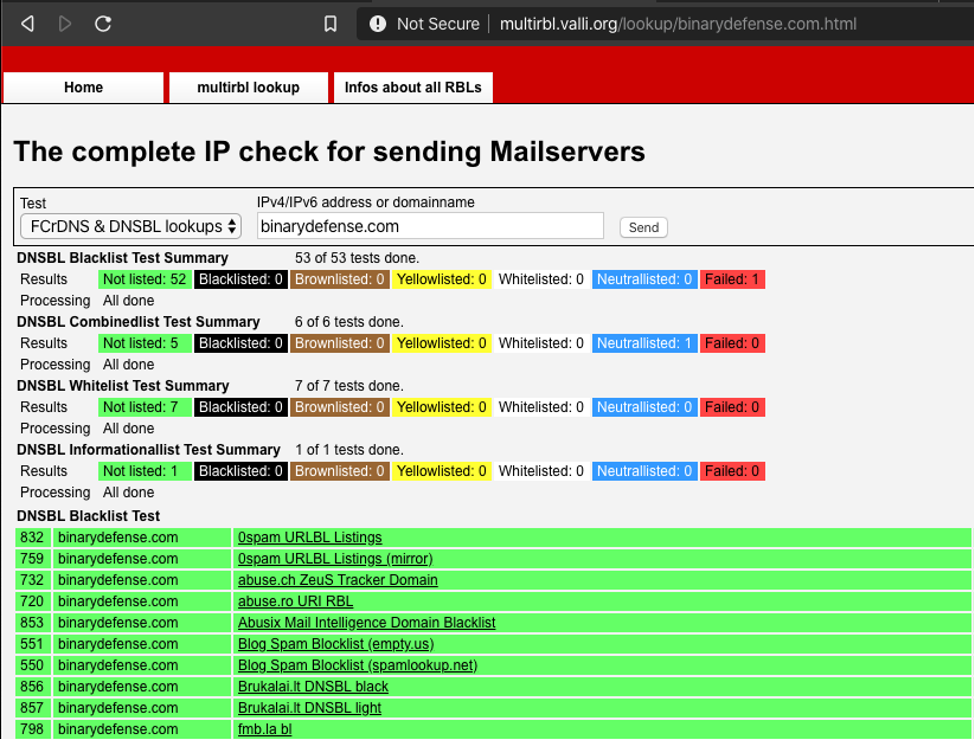
To check your IP address using Valli MultiRBL, visit their website at https://multirbl.valli.org and enter the IP address in the provided field and click "Send". Within 60-90 seconds, they will provide results of querying all every blacklist supported by their platform. At the top of the screen, they provide a summary of results, with a list of all individual results below this.
If your IP is included in any blacklists, scroll through the results to get the details of each inclusive blacklist. For Sender Score Blacklist, specifically, scroll down until you reach the Sender Score results (it will be fairly far down the list as they are listed alphabetically).
How to Delist IP Address from Sender Score Blacklist
If you find that one of your email server's IP address has been listed in the Sender Score Blacklist, the following steps will provide a blueprint for how to delist IP address from Sender Score Blacklist.
To Delist an IP Address from Sender Score Blacklist, follow these steps:
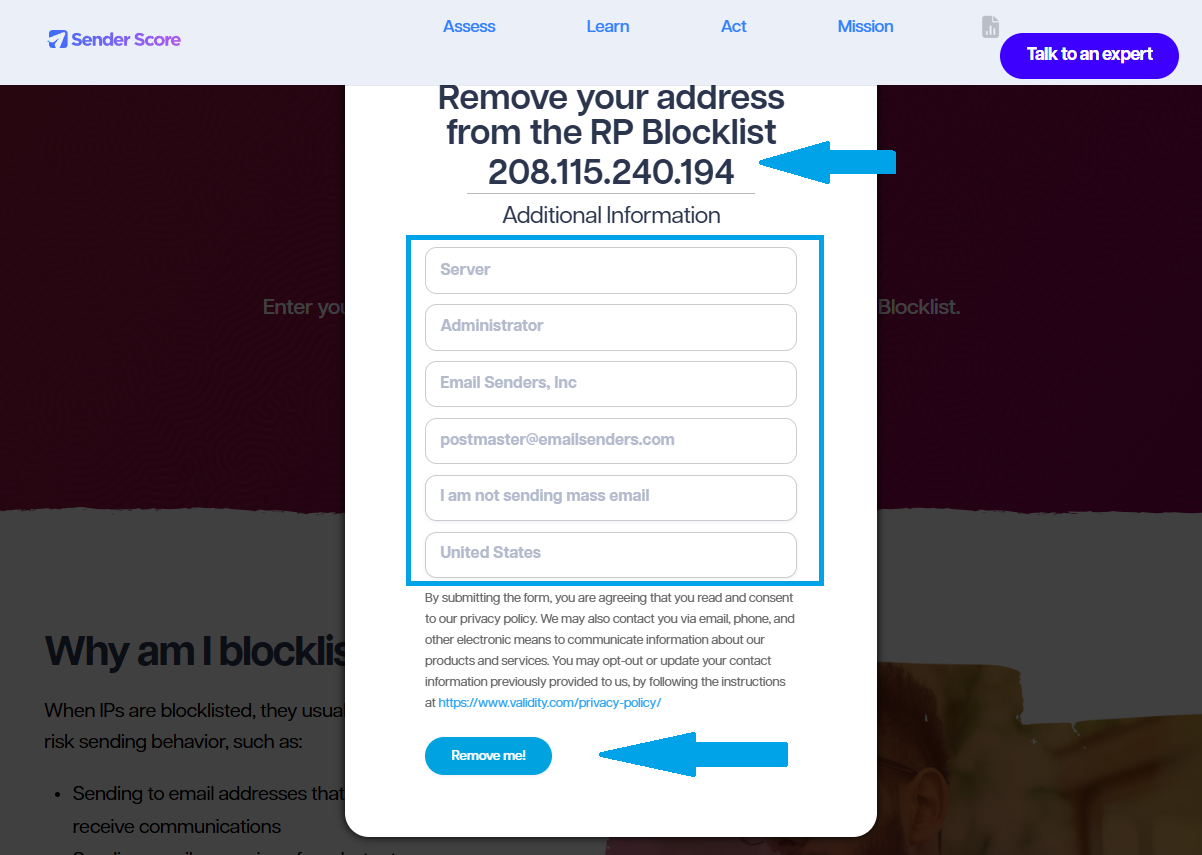
- Navigate to https://senderscore.org/act/blocklist-remover/ and enter the IP address in the provided field.
- Fill in the fields with relevant details (use correct information).
- Click the "Remove Me!" button to submit the delisting request.
- A confirmation screen will appear. Sender Score may contact you from the contact information you provide to finalize the delisting.
- Monitor your inbox for any messages from Sender Score related to the submission request.
- Follow any directions given by Sender Score to ensure the IP is removed from the database.
- That's it! You have now delisted the IP address from Sender Score.
Conclusion
That's it. You now know how to delist IP address from Sender Score Blacklist blacklist.
