
 👀 Choose SSD-powered VPS servers for increased speed, power, and security! Now 50% off- starting from only $3.19/mo.
Follow this guide to update MTU speed on CentOS VPS servers.
Prerequisites
To update the MTU speed of your CentOS VPS server, the following requirements must be met:
- Must have access to VPS server with CentOS as the operating system.
- Requires 'root-level' or SUDO-user capable of processing root-level commands.
- CentOS 6/CentOS 7/CentOS 8 supported
Let's get started, by following the guides below, keeping an eye on the CentOS versions mentioned.
What is MTU Speed?
Maximum transmission unit (MTU) is the largest unit of data that can be sent or received in a single network layer transaction. MTU should be updated according to the underlying network capabilities, not to exceed the network speed assigned to the server's port(s).
Check MTU Speed of CentOS Server
Follow the instructions below to check your server's existing MTU settings.
- For CentOS 6:
- Login to your server via SSH, as root or root-capable SUDO user.
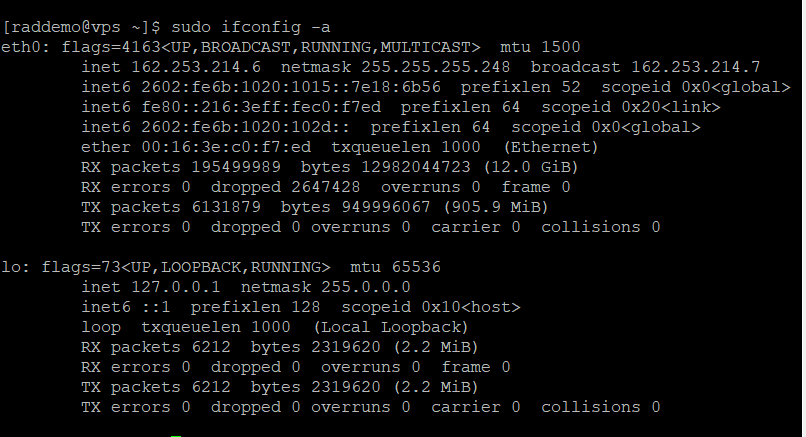
- Run the following command to check MTU speed for your existing network interfaces:
sudo ifconfig -a
- For CentOS 7/CentOS 8:
- Login to your server via SSH, as root or root-capable SUDO user.
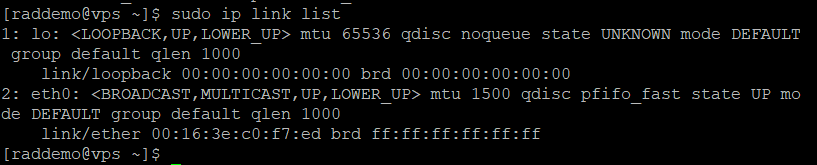
- Run the following command to check MTU speed for your existing network interfaces:
sudo ip link list
Update MTU Speed on CentOS VPS
Follow the instructions below to update your server's MTU speed.
- For CentOS 6:
- Login to your server via SSH, as root or root-capable SUDO user.
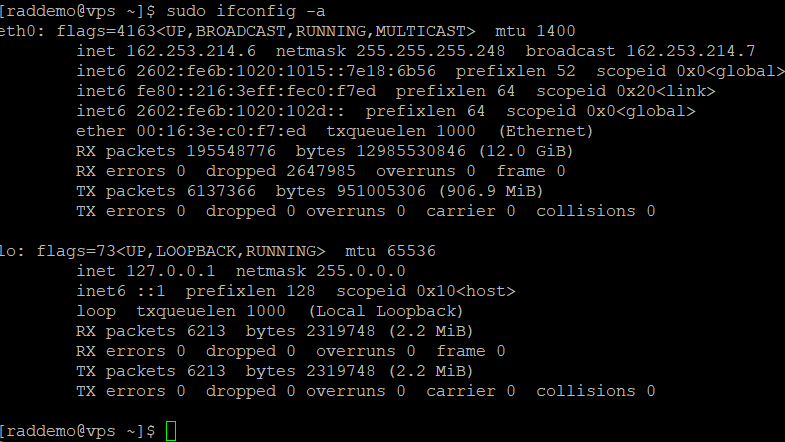
- Run the following command to update MTU speed (to 1400 MTU) for the server's network interfaces (as determined by previous step):
sudo ifconfig eth0 mtu 1400
- Verify your MTU speed on CentOS VPS using the same command from previous step (of CentOS 6 guide)
- For CentOS 7/CentOS 8:
- Login to your server via SSH, as root or root-capable SUDO user.
- Run the following command to update MTU speed (to 1400 MTU) for the server's network interfaces (as determined by previous step):
ip link set dev eth0 mtu 1400
- Verify your MTU speed on CentOS VPS using the same command from previous step (of CentOS 7/CentOS 8 guide):

You have now updated network MTU speed for your CentOS VPS.
