
 👀 Choose SSD-powered VPS servers for increased speed, power, and security! Now 50% off- starting from only $3.19/mo.
This article will provide a guide to modify the primary domain of Webuzo server. This process is useful in many circumstances, such as when transitioning a development environment to production server.
Modify Primary Domain of Webuzo Server
- Login to the Webuzo server as root/admin user.
- Under "Settings" menu, access "Webuzo Config" submenu item.
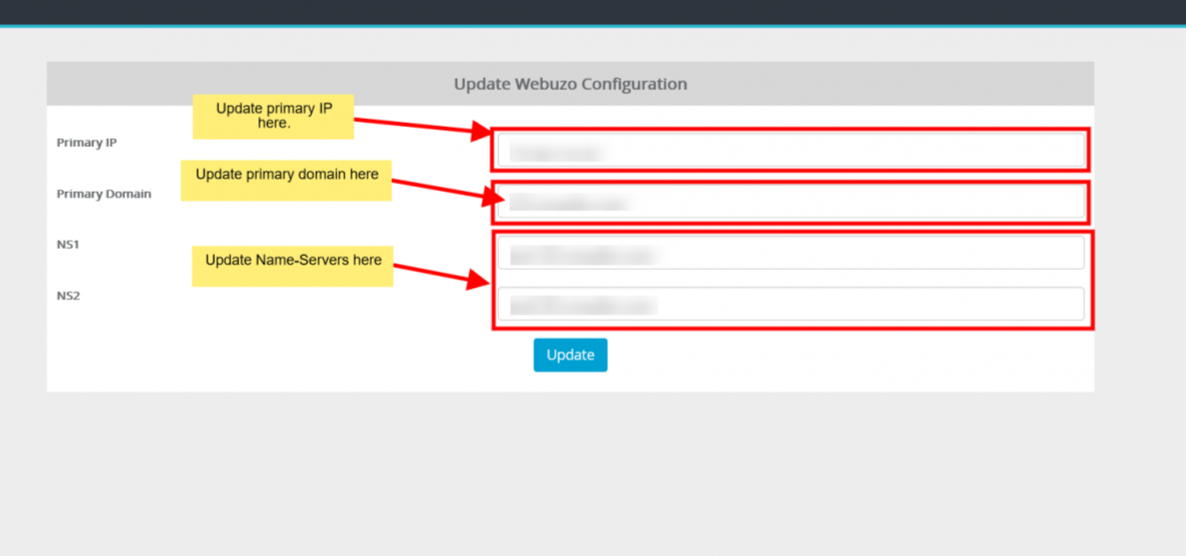
Manage Nameservers and Primary IP
Steps:
- Update the Primary IP
- Update the Primary Domain
- Update your First Nameserver
- Update your Second Nameserver
- Update Settings
You should now update and reboot the server to complete this process.
