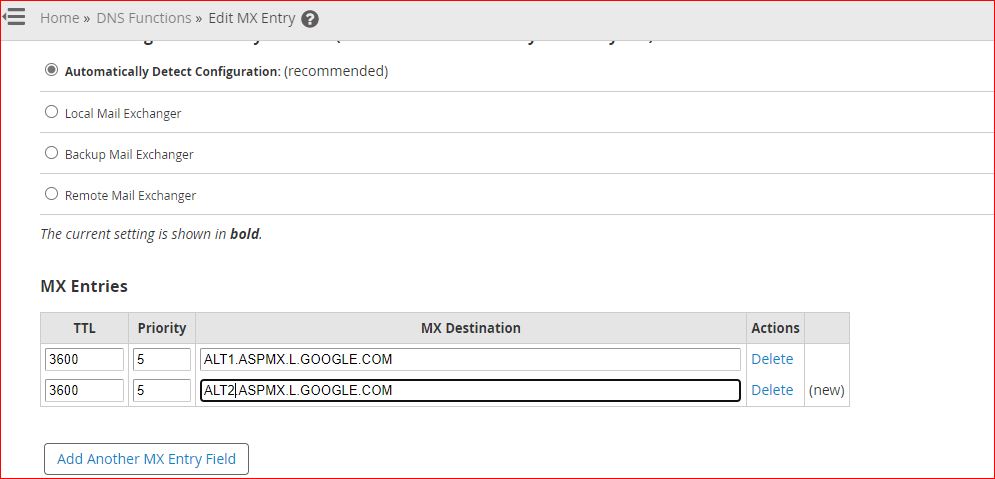
Edit MX Records in WHM

This article provides a guide for WHM users to modify MX records of domains using the NS of the WHM server/cluster.

How to Edit MX Records in WHM

  1. Login to WHM server
  2. Navigate to DNS Functions -> Edit MX Entry
  3. Select the domain to be edited
  4. Modify the entry
  5. Save

Edit MX records in WHM

  • mx records, whm, whm user, whm account
  • 0 Kasutajad peavad seda kasulikuks
Kas see vastus oli kasulik?

Seotud artiklid

Guide to Domain EPP Status Codes

EPP Status Codes are used by the Domain Registry to signify the status of a particular domain...

Addon Domain Vs Alias Domain

The table below lists some key characteristics of Addon Domain and Alias Domain....

Disable Network Manager on CentOS 7

This article will provide the steps to disable Network Manager in CentOS 7. Network Manager is...

Disable Network Manager on CentOS 6

This article will provide the steps to disable Network Manager in CentOS 6. Network Manager is...

Video: How to Setup Domain Redirects in cPanel

This video tutorial provides Step-by-Step instructions how to setup domain redirects in cPanel...